

Switch Accessible Art

Choice and Control
With the right system, artists of all abilities can create art of their own using one switch alone.
The Ambiomat is a one-switch Mosaic art creation tool for all ages. Saves a PNG picture file after each completed run, that can be printed off using Window's print wizard. By Rob Fearon.
News on one-button art ideas.
La Mosqueta - Two switch colouring in activities.
Help Kidz Learn - Various on-line switch accessible activities aimed at children and the young at heart. Includes Build a Sandcastle, Card Maker and Mosaic Painter.
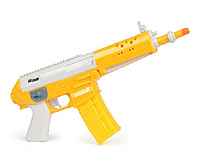
Switch Adapted Water Pistol - Can be used with watered down coloured inks to create art, best when used in conjunction with a Non-Interventionist art system.
Switch Adapted Digital Cameras - Links to a blog post on various Switch adapted digital cameras from around the world, including mounting solutions.
Switch Accessible Music - Devoted to switch accessible music, including the Guitar Shred Show and the exciting Skoog.
Disability Arts - Links to people working in accessible art for the Disabled and Special Needs (ableize.com)
CafePress.com - Sell your own art on-line, on T-shirts, Postcards, Calenders, Bags and so on.
The Smalls - A more intimate place to showcase short films than YouTube.
Rough ideas for non-interventionist art creation:
Make style books for people to choose from - that have fixed rules as to how each example sheet was created (only to be broken by the artist - not the helper). Choose deliberately - or at random (flick through - hit a switch to stop - that is the system to follow).
Make rules to be selected at random - e.g. 1= red 2= blue 3= orange 4=black 5=yellow 6=white - get the person to throw a die to roll and select - if they can't deliberately. This is their own pure luck.
Time art creation
Use computer art package FX such as blurring, glare and so on using the same method - or from a flick book.
On-line dice: Thurrock Care Switch Programmes and a mix of number generators.
Please get in touch for more information, and especially if you know someone who may like to include thier work here.
E-mail submissions and enquiries to: art@OneSwitch.org.uk